Using the Service Manager and the Domain Designer
This guide takes you from a clean checkout to a modelled domain exported as contracts, and then to a running service. It is task-ordered: install, run, model, validate, export, configure the runtime, register deploy targets, and recover when something breaks.
It is the entry point to the Service Management documentation chain. Each section links to the reference document that owns the subject in depth.
1. What the Service Manager is
The Service Manager is a local, zero-build browser application served over plain Node HTTP. It is the design surface of the monorepo: you model domains, declare communication interfaces, configure the runtime profile, and register deployment targets.
Nothing in it is a mock. Its exports are real artifacts you feed into
apps/backend-template/, and the Service Configuration tab writes directly to
the environment files the backend boots from.
Implementation:
| Path | Responsibility |
|---|---|
apps/service-management/index.html | Tab shell, panels, import map |
apps/service-management/script.js | Designer wiring and event handlers |
apps/service-management/src/ | Store, sync, UI and PWA modules |
apps/service-management/server.js | Static server plus the runtime APIs |
packages/designer-core/ | DOM-free model, validation, exporters, importers |
packages/cana/ | IndexedDB adapter used as the designer store |
2. Prerequisites
- Bun
>=1.3.13(the repository pinsbun@1.3.13) - Node.js
>=22.0.0 <23.0.0 - PM2, installed as a workspace dependency
rtkfor repository command execution- A Chromium-based or Firefox browser with IndexedDB enabled
Install the workspace dependencies once:
rtk proxy bun install3. Vendored browser bundles
The application is a zero-build SPA that resolves two bare specifiers through
the import map in index.html: @jumentix/cana and @jumentix/designer-core/.
Both targets live under apps/service-management/vendor/, are gitignored, and
are generated locally.
The dev entry points generate them for you — dev:service-management and the
pm2:start:dev:* scripts run the vendor step before starting the process, so a
fresh clone boots a working designer with no extra command.
Generate them by hand when you start the server directly, without PM2:
rtk proxy bun run service-management:vendorThat single script writes the Cana browser bundle to
apps/service-management/vendor/cana/index.js and mirrors
packages/designer-core/src into
apps/service-management/vendor/designer-core/.
Without the bundles the page loads, the shell renders, and every panel stays
inert because the module graph never resolves, with repeated /vendor/... 404s
in the browser console. The browser integration suites generate them before
booting the server, so a stale bundle can never read as a designer outage in
CI.
4. Running the application
4.1 Start it alone
rtk proxy bun run dev:service-managementThis starts the PM2 process jumentix-dev-service-management with the Bun
interpreter. Open:
http://127.0.0.1:32004.2 Start it with the backend
rtk proxy bun run devdev maps to pm2:start:dev:restapi, which starts
jumentix-dev-service-management and jumentix-dev-restapi from
pm2/ecosystem.dev.config.cjs. Use the realtime variants when you also need a
WebSocket or gRPC process:
rtk proxy bun run dev:websocketrtk proxy bun run dev:grpc4.3 Run it without PM2
NODE_ENV=dev bun apps/service-management/server.js4.4 Environment variables
Every variable below is prefixed JUMENTIX_SERVICE_MANAGEMENT_, except
NODE_ENV.
| Variable | Default | Purpose |
|---|---|---|
…_PORT | 3200 | HTTP port |
…_HOST | 127.0.0.1 | Bind address |
…_CONFIG_DIR | apps/backend-template/src/config | Where the runtime env API reads and writes |
…_PM2_DIR | pm2/ | Where the PM2 ecosystem preview reads |
…_AUTH_TOKEN | unset | Requires Authorization: Bearer <token> on the env POST |
…_STATIC_MANIFEST_REFRESH | from NODE_ENV | on-miss re-scans the static manifest; boot-only never does |
NODE_ENV | dev | Fallback environment when a request names none |
The server fails closed at boot when the configured directory does not
exist: it prints Service Management config directory not found: <path> on
stderr and exits with code 1. Serving defaults for a missing directory would
be a contract violation, so it refuses to start instead.
Ports per PM2 profile:
| Ecosystem | Process | Port |
|---|---|---|
pm2/ecosystem.dev.config.cjs | jumentix-dev-service-management | 3200 |
pm2/ecosystem.staging.config.cjs | jumentix-staging-service-management | 4200 |
pm2/ecosystem.production.config.cjs | jumentix-prod-service-management | 5200 |
4.5 Process control
rtk proxy bun run pm2:listrtk proxy bun run pm2:logsTo restart only this application after editing its source:
pm2 restart jumentix-dev-service-management5. First run
On a fresh browser profile the designer boots to an empty model. Every tab shows a guided empty state naming that tab’s first action — there is no silent pre-populated template.
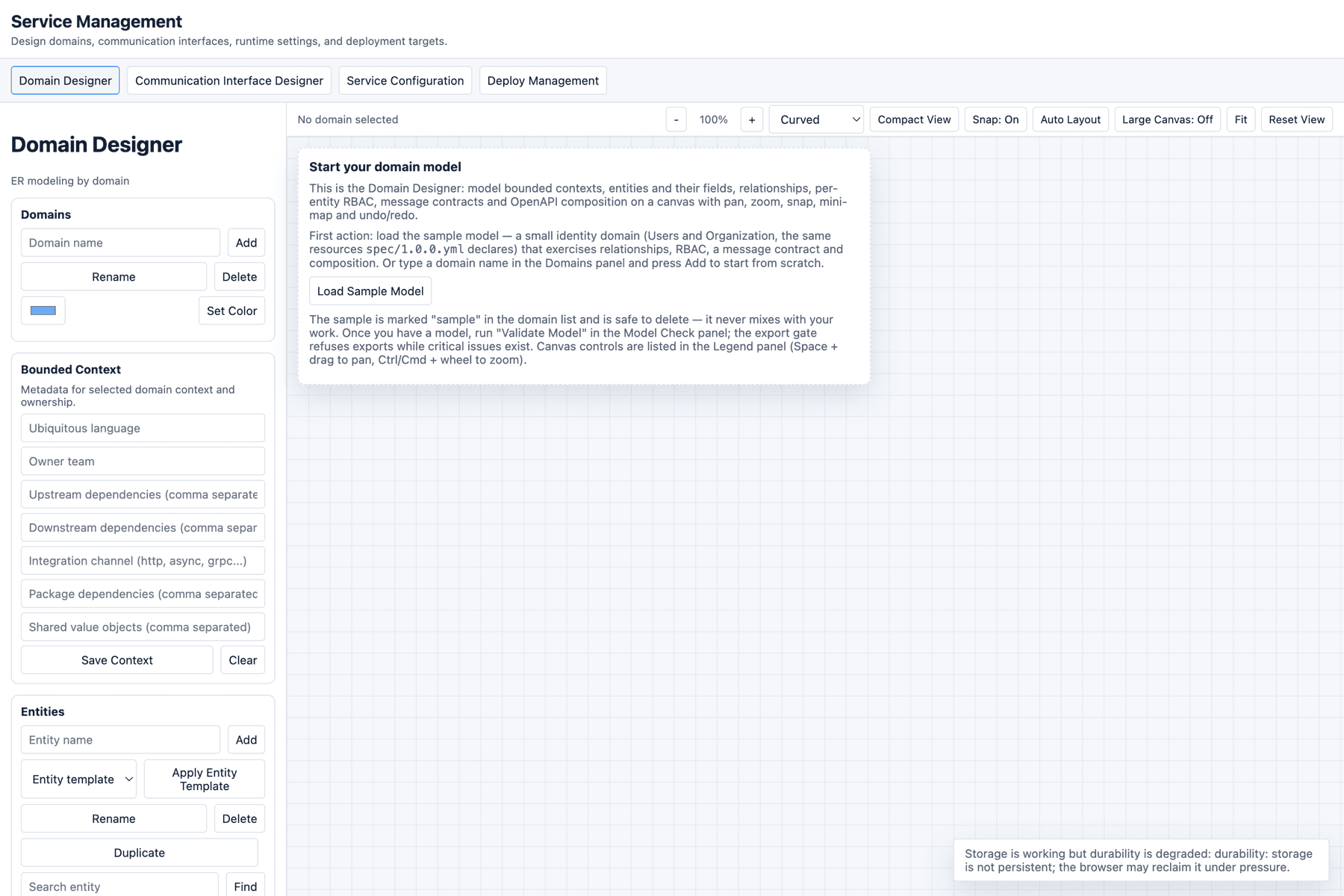
The Domain Designer’s first action is Load Sample Model (also available in
the Export panel). One click loads a realistic identity domain — Users,
Organization, Email, Phone and ContactPoint, the same resources
spec/1.0.0.yml declares — with relationships, per-entity RBAC, a message
contract, invariants and OpenAPI oneOf + discriminator composition.
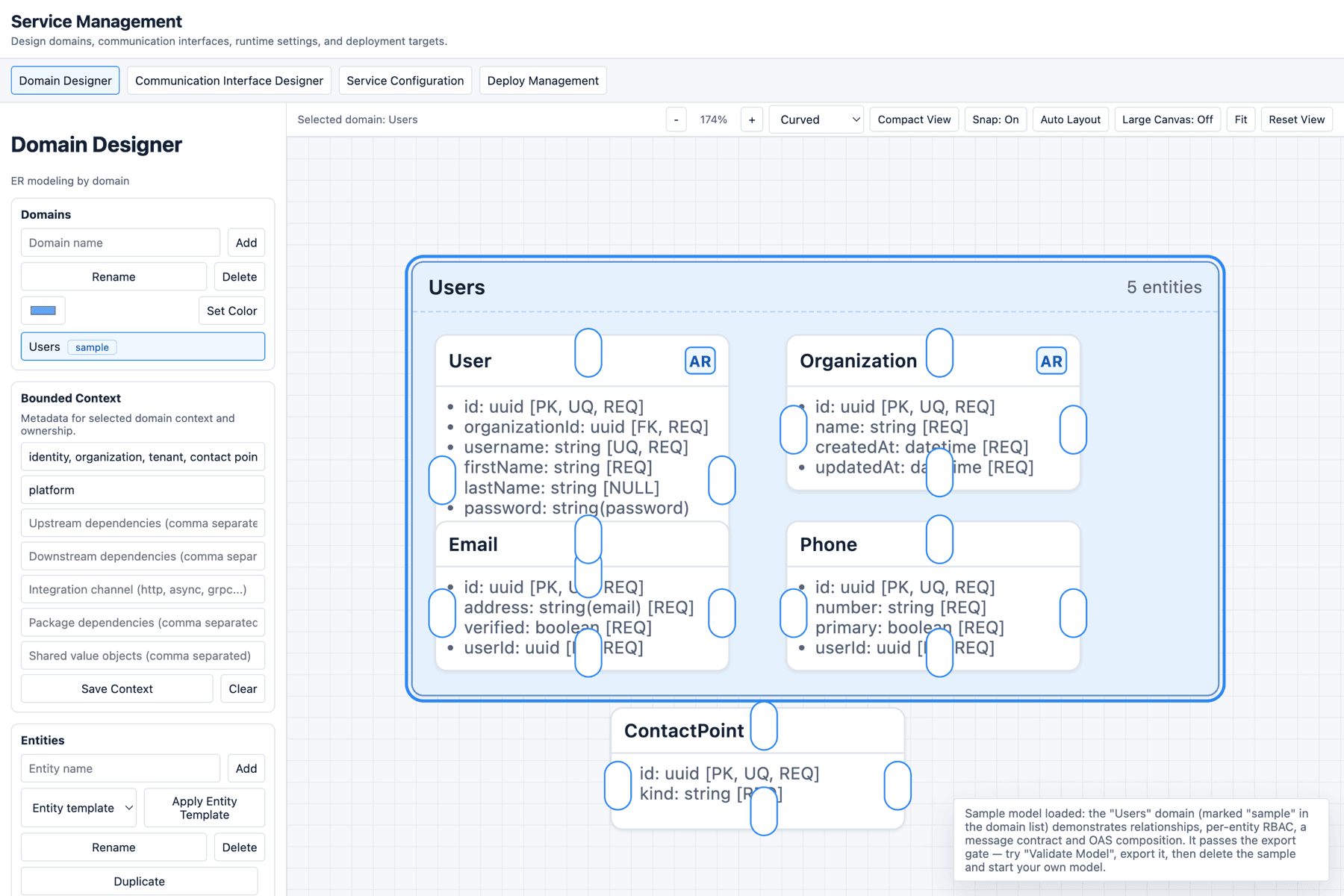
Sample content stays distinguishable from your own work: every sample id
carries a sample- prefix and sample domains show a sample badge in the
domain list. Loading it over an existing model asks for confirmation, and undo
restores the previous model. Deleting it is ordinary domain deletion.
A complete first round trip:
- Click
Load Sample Model. - Click
Validate Modeland read the Model Check panel. - Click
Export OAS 3.1— the browser downloadsdomain-designer-oas-3.1.json. - Delete the sample domain and model your own.
6. Domain Designer
6.1 Canvas and navigation
| Control | Effect |
|---|---|
Ctrl/Cmd + mouse wheel, - / + | Zoom |
Space + drag | Pan the canvas |
Fit | Frame the whole model |
Reset View | Restore the default viewport |
Snap: On | Toggle snap-to-grid |
Compact View | Collapse entity cards to their headers |
Large Canvas: Off | Toggle the high-density performance mode |
Auto Layout | Reflow domains and entities |
Curved / Orthogonal | Relationship routing style |
| Mini-map | Move the viewport to a domain in one click |
Keyboard shortcuts. All of them stand down while the focus is inside an
input, textarea or select:
| Shortcut | Action |
|---|---|
Ctrl/Cmd + Z | Undo |
Ctrl/Cmd + Shift + Z, Ctrl/Cmd + Y | Redo |
Arrow keys | Nudge the selected entity by 8px |
Shift + Arrow keys | Nudge by 16px |
Delete / Backspace | Delete the selected relationship, or the selected entity after a confirmation |
Alt + L | Auto layout |
Alt + R | Start a relationship from the selected entity |
Alt + V | Toggle compact view |
Escape | Cancel pick mode, cancel an anchor drag, clear the relationship selection |
Every outcome — success, refusal and reason — is announced in the status region under the tab bar, which is also a screen-reader live region. When an action appears to do nothing, read that line first.
6.2 Domains and bounded context
Create, rename, delete and colour domains from the Domains panel. With a
domain selected, the Bounded Context panel captures the strategic metadata:
ubiquitous language, owner team, upstream and downstream dependencies,
integration channel, package dependencies and shared value objects. Click
Save Context to persist, Clear to reset.
This metadata travels with the JSON, Markdown and domain-package exports.
6.3 Entities, fields and templates
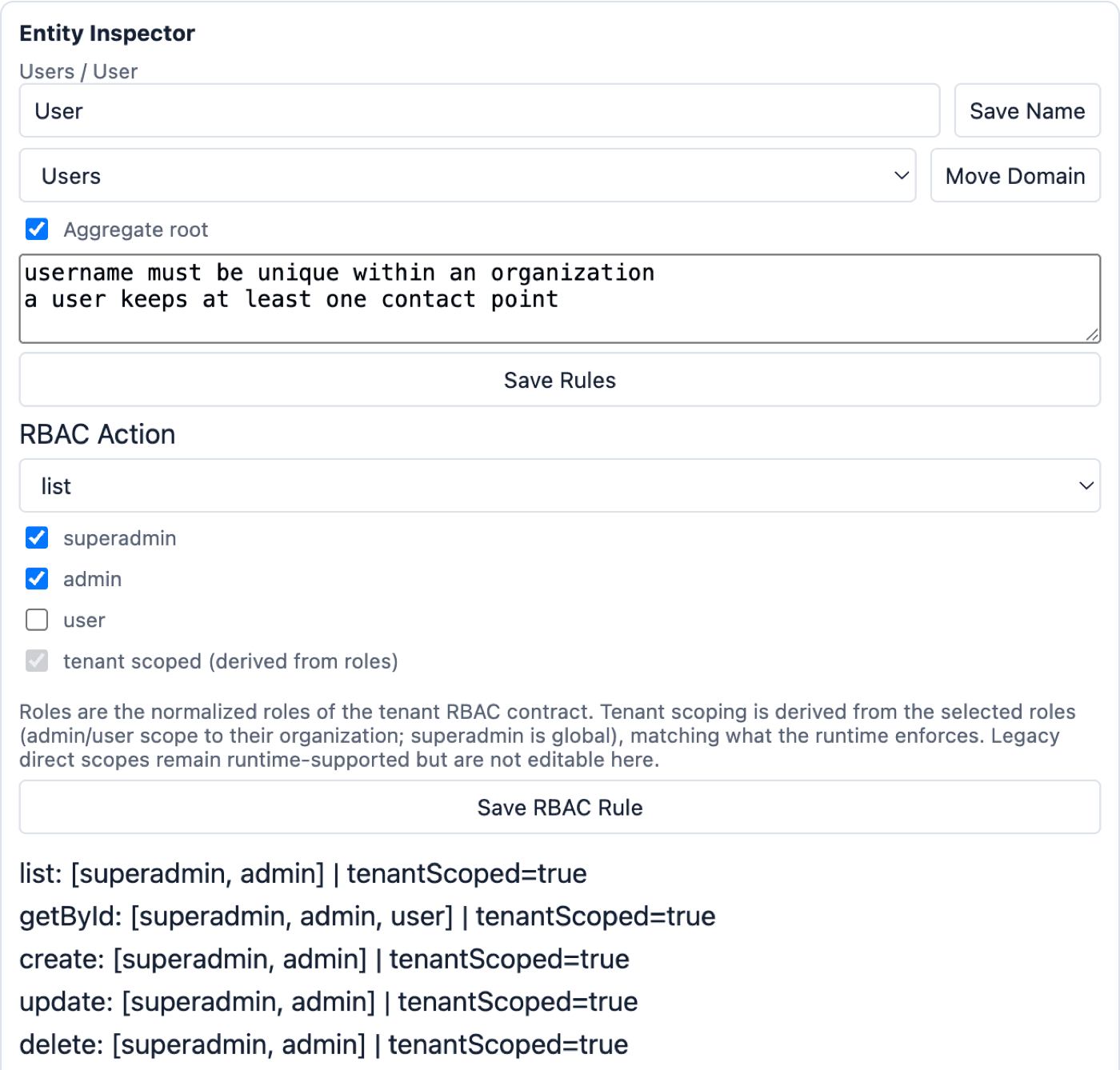
With an entity selected, the Entity Inspector offers Save Name,
Move Domain, Duplicate, Delete, and Save Rules for the aggregate-root
flag and the invariants (one rule per line). Aggregate roots show an AR
marker on their card.
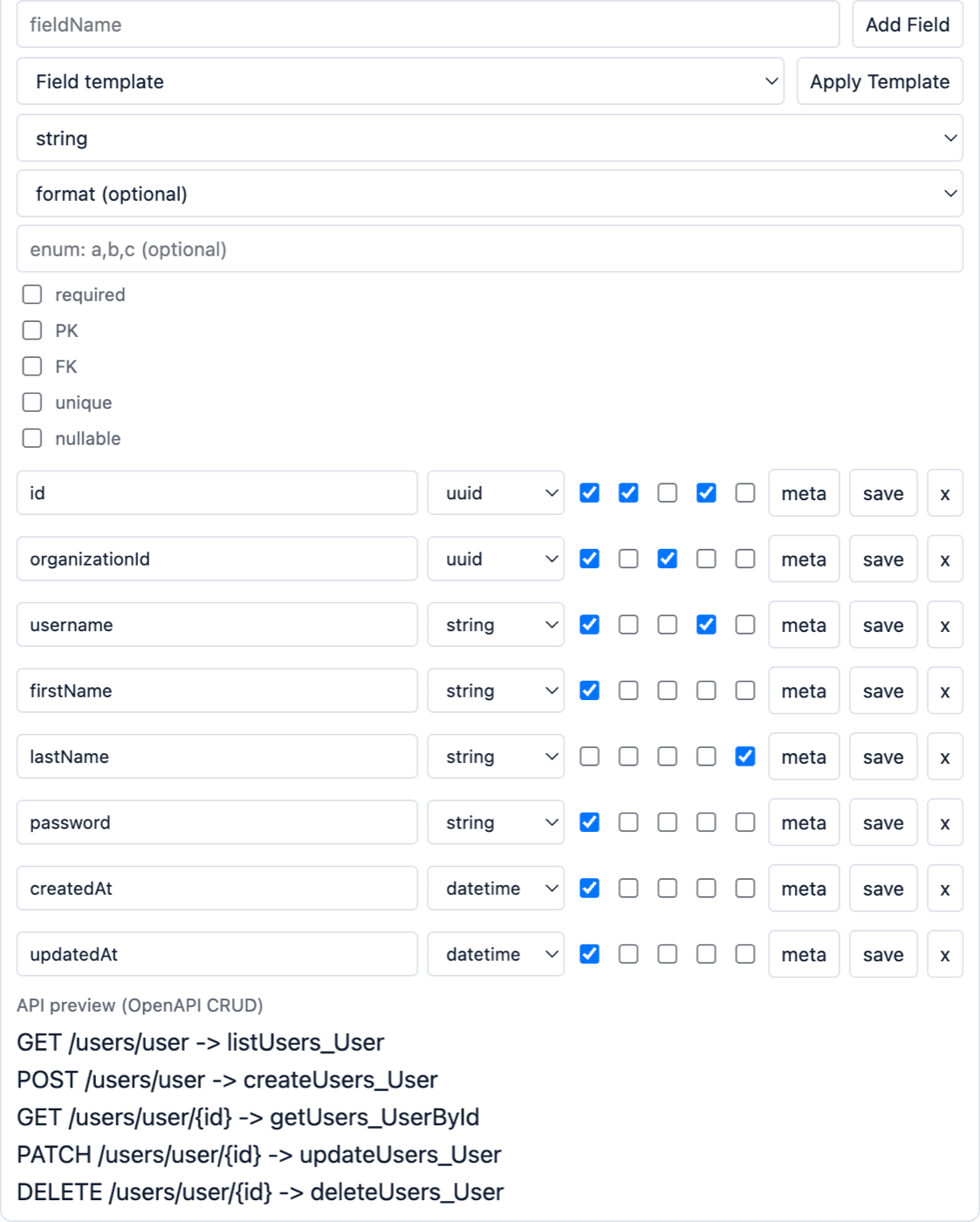
Fields carry OpenAPI-aligned metadata:
| Attribute | Values |
|---|---|
type | string, integer, number, boolean, array, object, date, datetime, uuid |
format | uuid, date, date-time, email, uri |
| Flags | required, PK, FK, unique, nullable |
enum | Comma-separated allowed values |
| Extended metadata | description, pattern, minLength, maxLength, minimum, maximum, itemsType, through the meta button on the field row |
Field templates add a fixed set of fields, skipping any name already taken:
| Template | Fields added |
|---|---|
tenantRef | organizationId (uuid, required, FK) |
auditTrail | createdBy, updatedBy (uuid, required, FK) |
softDelete | isDeleted (boolean, required), deletedAt (datetime, nullable) |
contactPack | emails, phones (array of string) |
Entity templates reshape the whole entity: crudAggregate, eventSourced,
referenceData and tenantOwned.
The inspector also renders an API preview (OpenAPI CRUD) — the five routes the exporter will emit for the entity, so you see the contract before exporting it.
6.4 Relationships
Three ways to create one:
- select source and target in the Relationship panel and click
Connect; - click
Pick On Canvasand click the two entities; - drag from an edge anchor (
top,right,bottom,left) onto another entity.
Leave auto FK ticked to generate the foreign key on the target side.
With a relationship selected you can tune cardinality (1 or N per side),
label offset (x, y, plus Reset Label Pos), bend path (bendX, bendY),
anchor behaviour (auto or center) and routing style. Click
Save Relationship to apply, Reverse to flip direction.
Two guards apply on creation: source and target must be different entities, and a relationship between the same pair cannot be duplicated.
6.5 RBAC, message contracts and OpenAPI composition
For each entity and action (list, getById, create, update, delete),
toggle superadmin, admin and user, then click Save RBAC Rule. Tenant
scope is derived from the roles, not set by hand: admin and user scope to
their organization, superadmin is global, which is what the runtime enforces.
Legacy direct scopes still run but are not editable here.
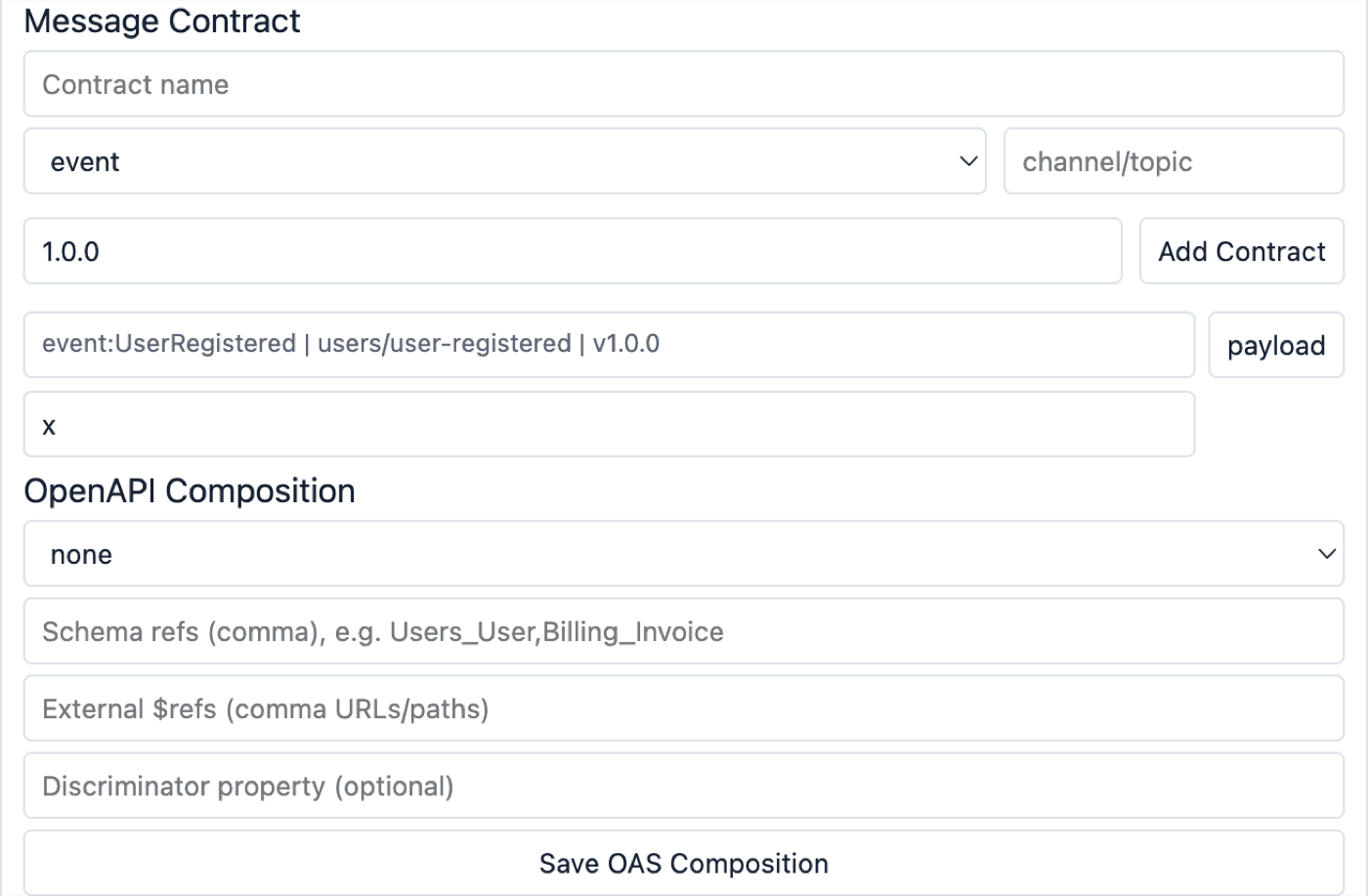
Declare event, command, request and response contracts per entity with a
name, channel or topic, version, and a JSON payload schema. Add Contract
registers one; the payload button on a listed contract edits its schema.
Invalid JSON is refused with an explicit message.
Per entity, choose an OpenAPI composition mode (oneOf, allOf, anyOf), list
schema refs, add external $ref targets and set a discriminator property, then
Save OAS Composition.
Where these land in the exported documents — and the exact fidelity guarantees of each crossing — is owned by Contract Parity Guarantees.
6.6 Validation, the export gate and schema diff
Validate Model runs the model checks. Each issue carries a severity (error,
warn, info) and is prefixed accordingly. The minimum-severity selector
filters the list.
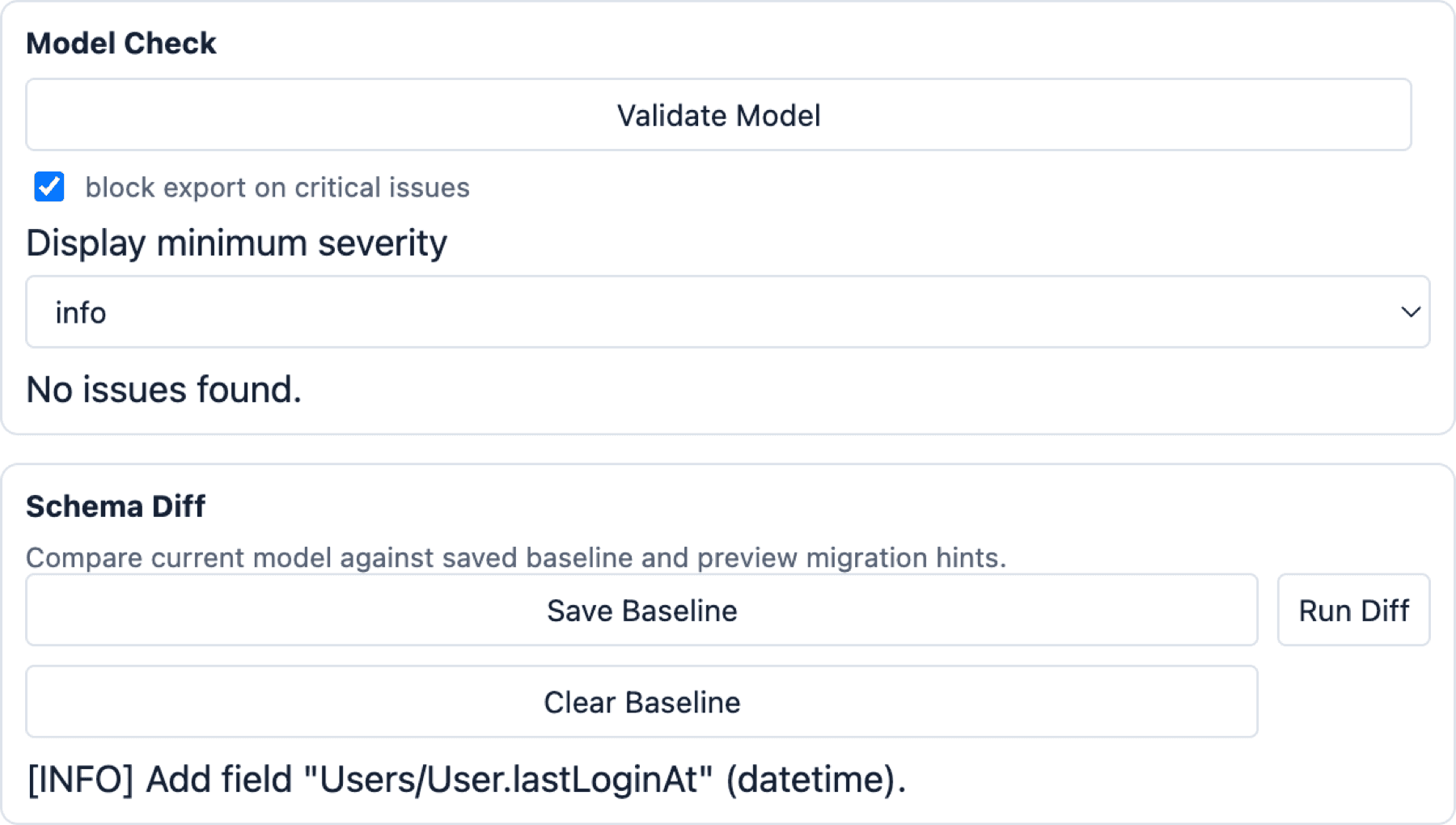
Tick block export on critical issues to turn validation into a hard gate.
Every export path calls the gate first and refuses while any error-severity
issue exists.
For change control, Save Baseline snapshots the current schema and Run Diff
compares the model against it, reporting created and dropped domains, entities,
fields, relationships and message contracts, and flagging type and
required-flag changes as migration hints. Clear Baseline removes the
snapshot.
6.7 Generation, export and import
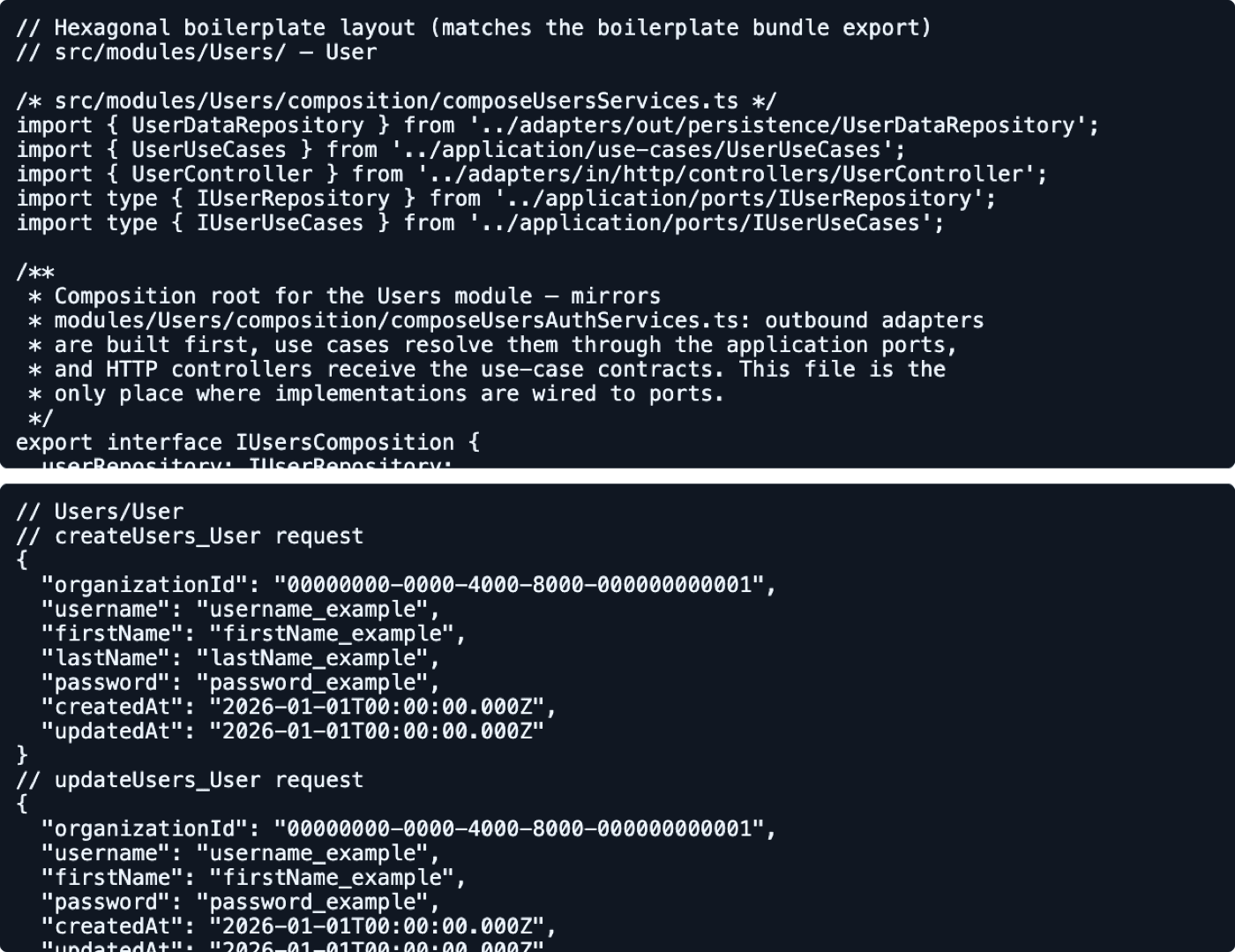
Code Preview renders skeletons for the domain model, repository port, use
case, controller and handler. Generate Examples renders request and response
payload examples. Select an entity to scope the output, or leave nothing
selected for the whole canvas.
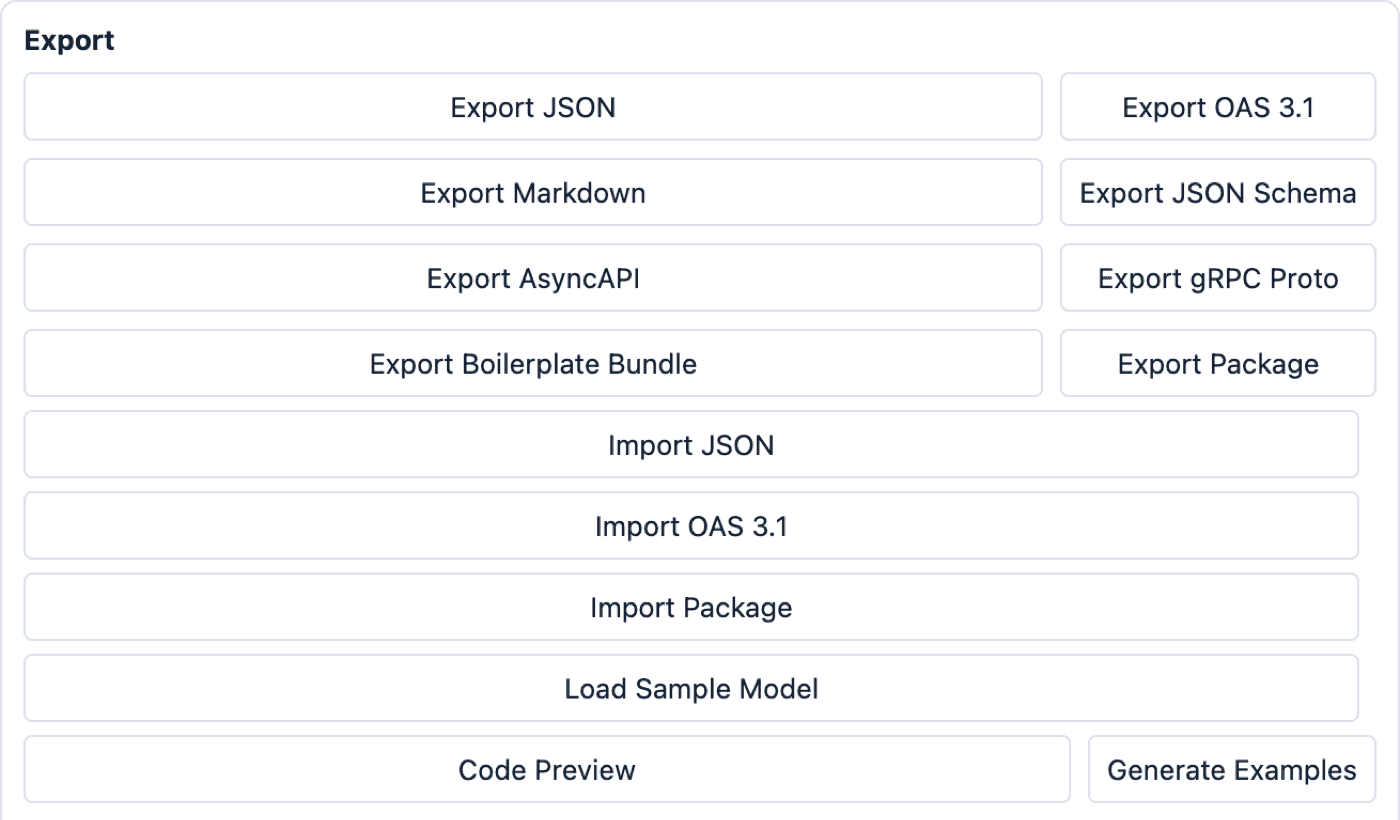
| Button | Downloaded file | Use |
|---|---|---|
Export JSON | domain-designer.json | Full model backup, re-importable |
Export OAS 3.1 | domain-designer-oas-3.1.json | REST contract |
Export Markdown | domain-designer-model.md | Human-readable model documentation |
Export JSON Schema | domain-designer-json-schema.json | Validation schemas |
Export AsyncAPI | one <version>.<transport>.yml per transport | Event and message contracts |
Export Proto | async-api.proto | gRPC service definition |
Export Boilerplate Bundle | domain-designer-boilerplate-bundle.json | Scaffolding input for the backend template |
Export Package | <domain>-package.json | One domain, shareable and re-importable |
Package export uses the selected domain as the source, so select a domain
first. Import targets are Import JSON, Import OAS 3.1 and
Import Package; each failure reason maps to one explicit status message.
Domain-package versioning, dependency graphs and conflict policy are owned by Collaboration and Packaging.
7. Communication Interface Designer
Register the inbound adapters that will serve the modelled operations.
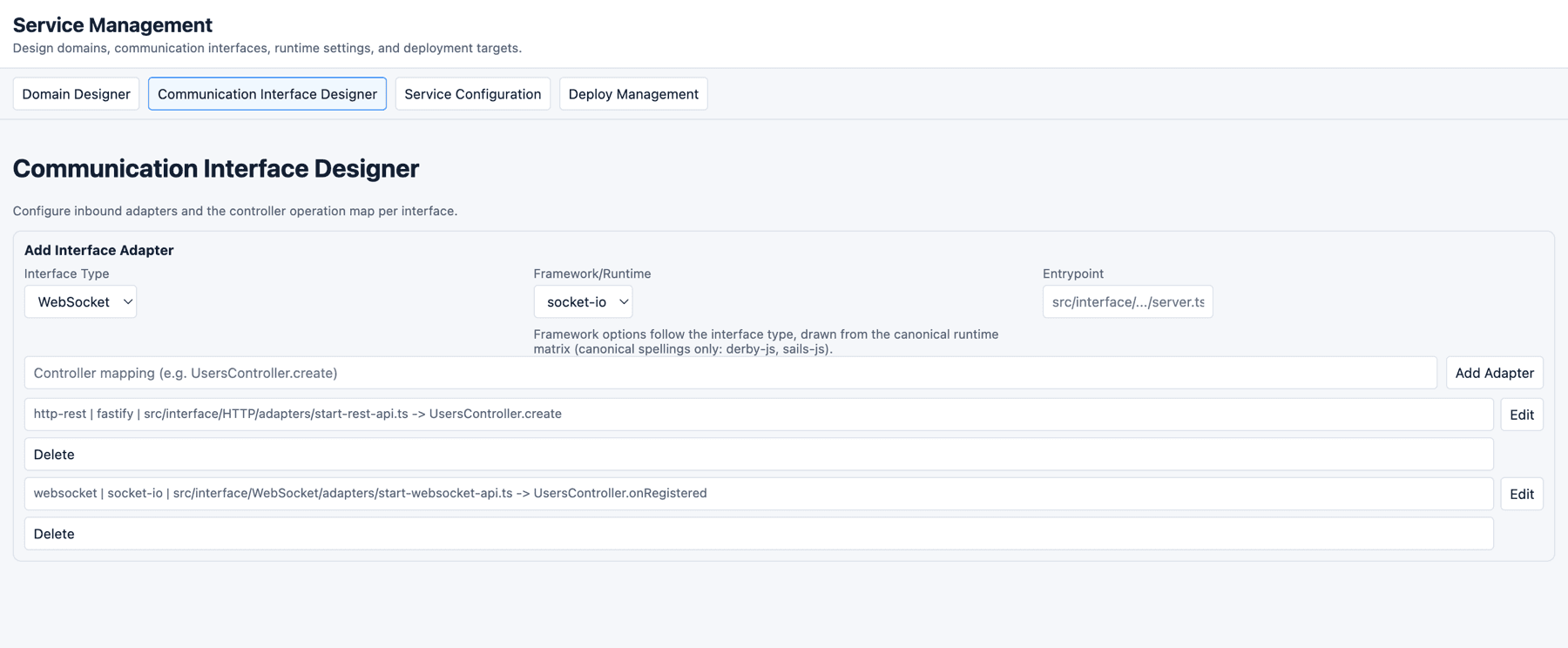
The candidate is validated before it touches state, and a refusal explains itself in the status region:
| Field | Rule |
|---|---|
| Interface Type | HTTP/REST, gRPC, WebSocket, SSE Server |
| Framework/Runtime | Follows the interface type, drawn from the canonical runtime matrix. WebSocket offers socket-io; gRPC offers grpc; HTTP/REST and SSE offer the eleven HTTP frameworks, in canonical spelling (derby-js, sails-js) |
| Entrypoint | A TypeScript/JavaScript path under src/interface/, for example src/interface/HTTP/adapters/start-rest-api.ts |
| Controller mapping | The shape XController.action, for example UsersController.create |
Duplicates are detected and refused. Type and framework stay selected after a successful add, so registering several adapters of the same kind does not re-pick them each time.
8. Service Configuration
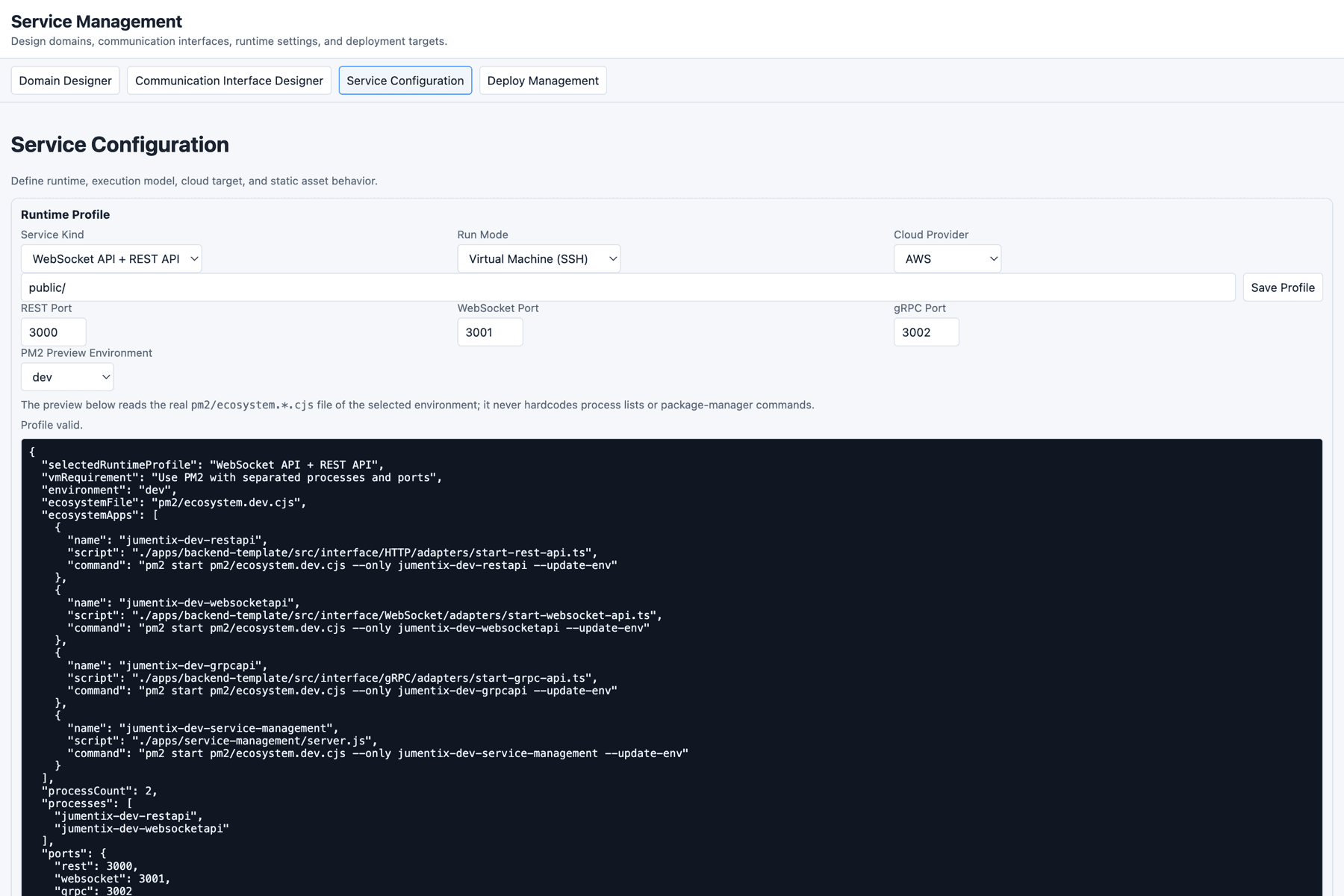
8.1 Runtime profile
| Control | Values |
|---|---|
| Service Kind | REST API, WebSocket API + REST API, gRPC API + REST API |
| Run Mode | Dedicated Server (SSH), Virtual Machine (SSH), Container, Functions |
| Cloud Provider | AWS, Google Cloud, Azure, Vercel, Cloudflare, Docker, Self Hosted |
| Static assets path | Optional, for example public/ |
| Ports | REST, WebSocket, gRPC |
Save Profile validates before it writes: ports outside range, ports colliding
across the protocols the selected service kind actually binds, and run-mode ×
provider combinations with no deploy target in the Requirement 059 matrix are
refused with the reason on the status surface.
8.2 PM2 ecosystem preview
The preview reads the real pm2/ecosystem.*.cjs files through
GET /api/runtime/pm2-ecosystem, so adding an app to an ecosystem file changes
the preview with no code change, and no package-manager invocation is embedded
anywhere. ci/test map to a file that does not exist in the repository; the
endpoint reports that as an explicit exists: false state rather than an error
or a silently empty list.
8.3 Runtime environment variables
The editor exposes runtime keys in two tiers. The write allowlist is a security
decision, pinned by Requirement 126:
| Tier | Keys |
|---|---|
| Editable | JUMENTIX_HTTP_FRAMEWORK, JUMENTIX_REALTIME_API, JUMENTIX_REALTIME_API_PROTOCOL, JUMENTIX_REALTIME_API_DATABASE_DRIVER, JUMENTIX_DATABASE_DRIVER, JUMENTIX_KEYVALUESTORAGE_DRIVER, JUMENTIX_MESSAGE_MEDIATOR_ADAPTER, JUMENTIX_WEBSOCKET_SOCKETIO_ADAPTER, JUMENTIX_WEBSOCKET_REDIS_URL |
| Read-only | Connection endpoints and non-secret configuration such as JUMENTIX_DATABASE_NAME, JUMENTIX_REDIS_HOST, JUMENTIX_RABBITMQ_EXCHANGE, JUMENTIX_CORS_ALLOWED_ORIGINS |
| Never exposed | Credential-bearing keys such as JUMENTIX_JWT_TOKEN_SECRET_KEY, JUMENTIX_REDIS_PASSWORD, JUMENTIX_RABBITMQ_URL — enforced by omission from both allowlists |
Each editable key is constrained to a canonical enum, so the editor cannot write a value the backend would reject at bootstrap.
Pick the environment, click Load Environment, change what you need, then
click Save Environment. The panel names the exact file it is editing.
Environment names map to files:
| Selected environment | File |
|---|---|
dev, development | .env.dev |
staging | .env.staging |
ci, test | .env.ci |
Any other value is refused with HTTP 400 naming the accepted set.
8.4 Driving the APIs directly
curl "http://127.0.0.1:3200/api/runtime/env?environment=dev"curl "http://127.0.0.1:3200/api/runtime/pm2-ecosystem?environment=dev"curl -X POST http://127.0.0.1:3200/api/runtime/env \
-H 'content-type: application/json' \
-d '{"environment":"dev","values":{"JUMENTIX_HTTP_FRAMEWORK":"fastify"}}'When JUMENTIX_SERVICE_MANAGEMENT_AUTH_TOKEN is set, the POST requires
Authorization: Bearer <token> and answers 401 without it. Reads are not
gated by the token.
Failure envelopes are distinct on purpose: a malformed body or a rejected value
is HTTP 400 with error and details; an unsupported environment is HTTP 400
naming the accepted values; a filesystem failure is HTTP 500 with error,
code, path and details. A broken ecosystem file reports separately as
PM2 ecosystem file operation failed.
Every mutation is logged server-side with the timestamp, the environment and the changed key names.
The env-file semantics, the enum sets and the fixed paths are owned by Runtime Environment Contracts.
9. Deploy Management
Register deployment targets with a name, target type, service type, region and runtime version. PM2-managed targets also take a PM2 profile.
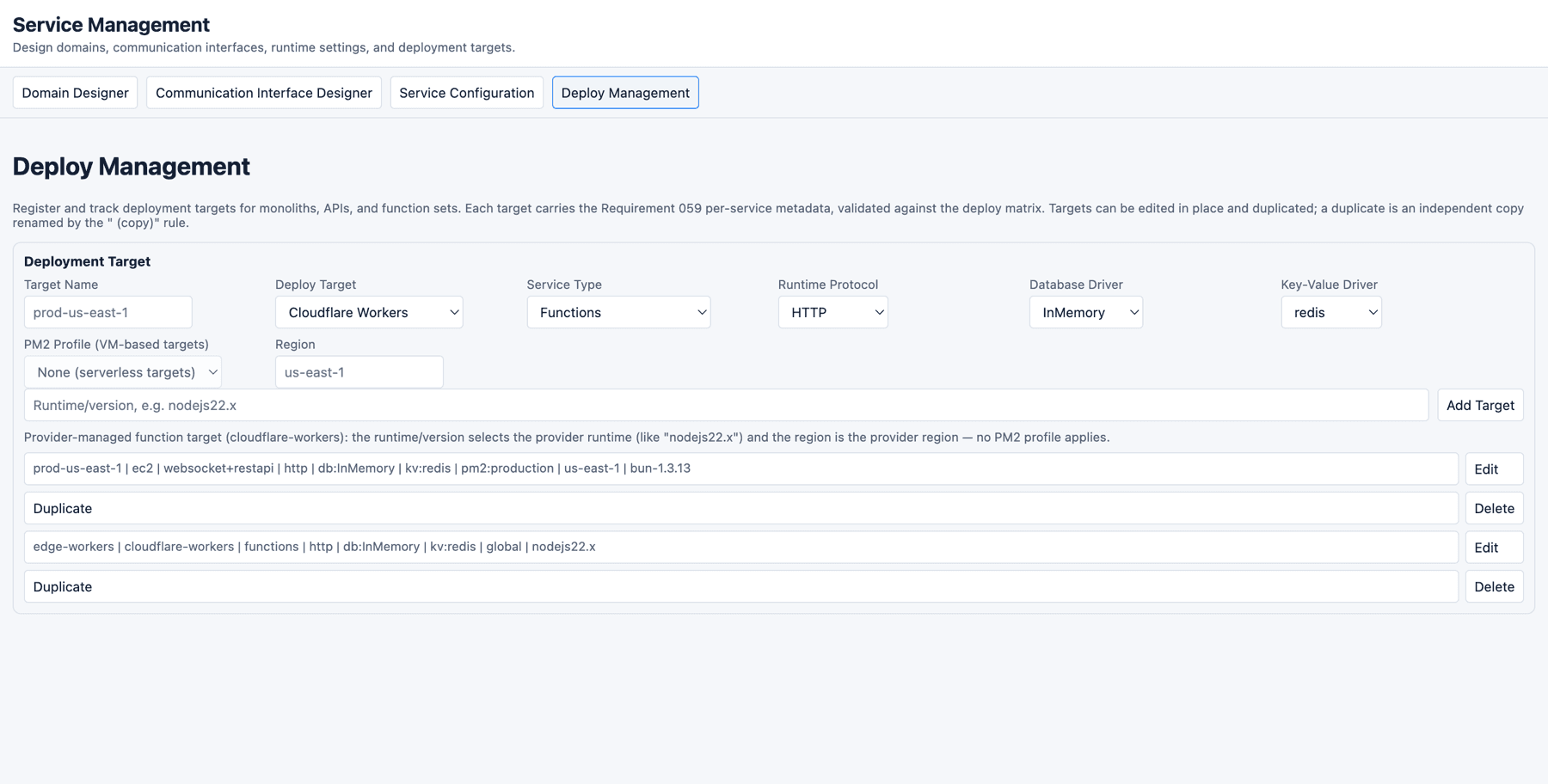
The form validates against the Requirement 059 deploy matrix and explains
every refusal:
| Target type | Service types it can run | PM2 profile | Region means |
|---|---|---|---|
dedicated-server, vm, ec2 | restapi, websocket+restapi, grpc+restapi | Required (dev, staging, production) | SSH host or instance address |
lambda, vercel-functions, cloudflare-workers | functions | Not applicable | Provider region |
The runtime/version field wants a name plus a version, such as nodejs22.x —
a bare runtime name is refused. Targets can be edited in place and duplicated;
Cancel leaves an edit without applying it.
The matrix, the metadata contract and the lifecycle rules are owned by Operations Console.
10. Where your work is stored
Cana (IndexedDB) is the sole designer store. There is no localStorage
fallback and no driver switch: no environment variable and no URL parameter can
route the designer to another store. A host that cannot resolve the Cana bundle
gets a store whose operations report unavailable — an explicit terminal state
the boot surfaces, never a silent fallback.
Three consequences worth knowing before you rely on it:
- Durability is reported, not assumed. When the browser has not granted persistent storage, the status region says so: storage works, but the browser may reclaim it under pressure.
- Multi-tab edits converge. A second tab of the same browser sees your changes through the committed-event stream; remote applies are not undoable and never import selection.
- Clearing site data deletes the model. The PWA “Reset app shell” action
touches only the
service-management-shell@*caches and never the designer data — but the browser’s own “clear site data” removes both.
Export a JSON model before any risky change: that file is the only portable backup.
Storage states, the one-way migration and the offline matrix are owned by Cana Adoption, Migration and Offline Behaviour. The install, update and recovery flows are owned by Design System and PWA Shell.
11. From the model to a running service
- Model the domains and entities.
- Run
Validate Modeland resolve every error. - Export OpenAPI 3.1 and, for event-driven services, AsyncAPI and the proto.
- Compare the output against the canonical specifications in
spec/. - Implement the use cases and adapters in
apps/backend-template/. - Set the runtime keys in Service Configuration.
- Start the matching PM2 profile and run the delivery gates.
- Save a schema baseline before the next modelling round, so the following diff produces migration hints.
12. Troubleshooting
The page loads but every panel is inert
The vendored bundles are missing. Run bun run service-management:vendor, then
reload. The dev entry points do this for you; starting server.js directly does
not. The browser console shows repeated 404s for /vendor/... in this
state.
The server exits immediately
It fails closed when the config directory does not exist, printing
Service Management config directory not found: <path>. Either run it from the
repository root, or point JUMENTIX_SERVICE_MANAGEMENT_CONFIG_DIR at a
directory that exists.
Port already in use
lsof -ti tcp:3200 | xargs killJUMENTIX_SERVICE_MANAGEMENT_PORT=3300 bun apps/service-management/server.jsChanging the port changes the browser origin, and IndexedDB is scoped per
origin — a model saved on 127.0.0.1:3200 is not visible on port 3300.
A new asset returns 404
The static manifest is built once at boot, deliberately: serving from a
pre-built allowlist bounds the servable surface. In development the manifest
re-scans on a miss; in any other mode it does not. Set
JUMENTIX_SERVICE_MANAGEMENT_STATIC_MANIFEST_REFRESH=on-miss to opt in, or
restart the process.
An action appears to do nothing
Read the status region under the tab bar. Adapter, service-profile and deploy-target forms validate before touching state and explain each refusal there.
An export does nothing
The export quality gate is on. Untick block export on critical issues, or
run Validate Model and resolve every ERROR entry.
Delete, the arrow keys or Space + drag do nothing
The keyboard handlers stand down while focus is inside an input, textarea
or select. Click empty canvas first.
Load Environment or Save Environment fails
Check the response envelope. A 400 names an unsupported environment or a
rejected value; a 500 carries code and path for the filesystem failure. A
401 means JUMENTIX_SERVICE_MANAGEMENT_AUTH_TOKEN is set and the request
carried no matching bearer token.
A saved runtime key has no effect
Environment files are read at process start. Restart the affected PM2 process:
pm2 restart jumentix-dev-restapiThe model disappeared
IndexedDB is scoped per origin and is removed by “clear site data”. Restore
with Import JSON from an exported backup. If the status region reports
degraded durability, the browser may have reclaimed the storage.
13. Verify your setup
rtk proxy bun run test:integration:service-managementThe suite covers the static server and manifest, the runtime env API and its contract, the PM2 ecosystem endpoint, first run, SPA boot, the Cana migration, multi-tab sync, the offline persistence matrix, the PWA shell, interface adapters, the deploy-target lifecycle and catalog sync.
References
- Runtime Environment Contracts
- Domain Designer Features and Usage
- Module Architecture and the IDesignerStore Port
- Contract Parity Guarantees
- Operations Console
- Cana Adoption, Migration and Offline Behaviour
- Design System and PWA Shell
- Collaboration and Packaging
- Creating SPA/PWA with Jumentix
- Creating a REST API with Jumentix